
Yes. AI meeting assistants can sync with practice management software when the assistant and the firm’s system support a compatible connection. The useful test is not whether a transcript moves across: it is whether the right client record receives an accurate, reviewable meeting note. Confirm the specific connection, field mapping and approval process before relying on it in an advice workflow.
- Yes, AI meeting assistants can sync with practice management software, but the connection must match the firm’s system.
- Alcova is best for advice firms seeking meeting notes, CRM sync and compliance records in one workflow.
- Check client matching, permissions and review before treating a synced note as a file record.
Can AI meeting assistants sync with practice management software?
Yes, but CRM sync and practice management sync are not interchangeable promises. A firm needs to establish which system receives the note, which client and meeting it attaches to, and what happens when a write fails. A feature described as sync can mean anything from a structured record update to a transcript that someone must file manually.
| Route | Best for | What it does | Advantage | Limitation to check |
|---|---|---|---|---|
| Alcova CRM sync | Advice firms that want meeting notes connected to CRM and compliance records | Brings meeting transcription, notes and CRM sync into Alcova’s advice-firm platform | Keeps those activities within a stated advice-firm workflow | Confirm the connection and permitted actions for your specific practice management system |
| Assistant with a verified system connection | Firms whose existing assistant supports their chosen system | Sends meeting information through a connection the firm has checked | Can retain an existing meeting tool | The available fields and approval steps depend on that connection |
| Manual transfer | Firms without a suitable connection | A person moves the reviewed note into the client record | Allows a person to check placement before filing | Creates a separate task and another opportunity to miss an update |
Alcova is best for advice firms that need meeting notes tied to CRM and compliance records, not just a transcript. That is a fit statement, not a claim that every practice management system connects to it. Ask for the exact destination system and record behaviour before making a platform decision in 2026.
A working connection also needs a defined source of truth. If an adviser edits a note after a meeting, decide whether the approved version lives in the assistant, the CRM or another record store. Without that decision, a successful transfer can still leave conflicting versions of the meeting on file.
Why this matters for advice firms
A meeting assistant saves little filing work if advisers still search for the right client, paste notes into the CRM and check whether the record stayed attached. The operational goal is a usable client file: meeting context, decisions and follow-up actions where the firm expects to find them. Transcription alone does not complete that job.
For an Australian advice firm in 2026, the distinction also matters to compliance teams. A meeting note can support recordkeeping, but a generated note is not automatically an approved record or a Record of Advice. The firm still needs to determine what must be checked, corrected and retained under its own process.
What should actually move between systems?
Start with the destination, not the assistant’s feature list. Name the record an adviser opens after a meeting. Then identify the information that belongs there and the information that must stay under review.
- Client and meeting identity: The note needs a clear destination. Check how the connection handles clients with similar names, joint clients and meetings without a matching record.
- Meeting note: Establish whether the destination receives a draft, an approved note, a transcript or a link to content stored elsewhere. Those are different outcomes.
- Actions and ownership: If follow-up tasks move across, check who owns them and whether changing a task in one system changes it in the other.
- Supporting material: Document generation and recordkeeping can sit alongside notes. Confirm whether documents themselves transfer or whether the systems only share references to them.
- Status: An adviser needs to see whether a note was sent, rejected or left awaiting review. A button press is not evidence that the client record changed.
This is the practical scope of sync in 2026. A meeting can be transcribed accurately while the resulting file note is attached to the wrong client. Treat content quality and record placement as separate checks.
How do you check a connection before using it?
Use a sample workflow that reflects how the firm actually files meetings. A vendor demonstration with an isolated test contact does not answer what happens when an adviser corrects a note, a client has multiple records or a sync fails.
- Identify records. Write down the meeting note, client record, action items and any compliance record that the workflow must produce. Mark which system holds the final approved version.
- Check permissions. Confirm who can start a transfer, review a draft, change a note and see the resulting record. Include the people who supervise file noting, not only the advisers who run meetings.
- Map fields. Match the information the assistant produces to fields the destination system can accept. Check the difference between a structured CRM field, a free-text note and an attached document.
- Test writes. Use representative client and meeting records. Check where the output lands, whether edits replace or duplicate content, and how the workflow handles a missing match.
- Review exceptions. Decide who receives a failed-transfer alert and how that person corrects the client file. Record the point at which a human approves the final note.
The sequence keeps the decision concrete: identify records, check permissions, map fields, test writes, review exceptions. It also exposes a common mismatch. A system can accept text without supporting the adviser’s preferred filing structure.
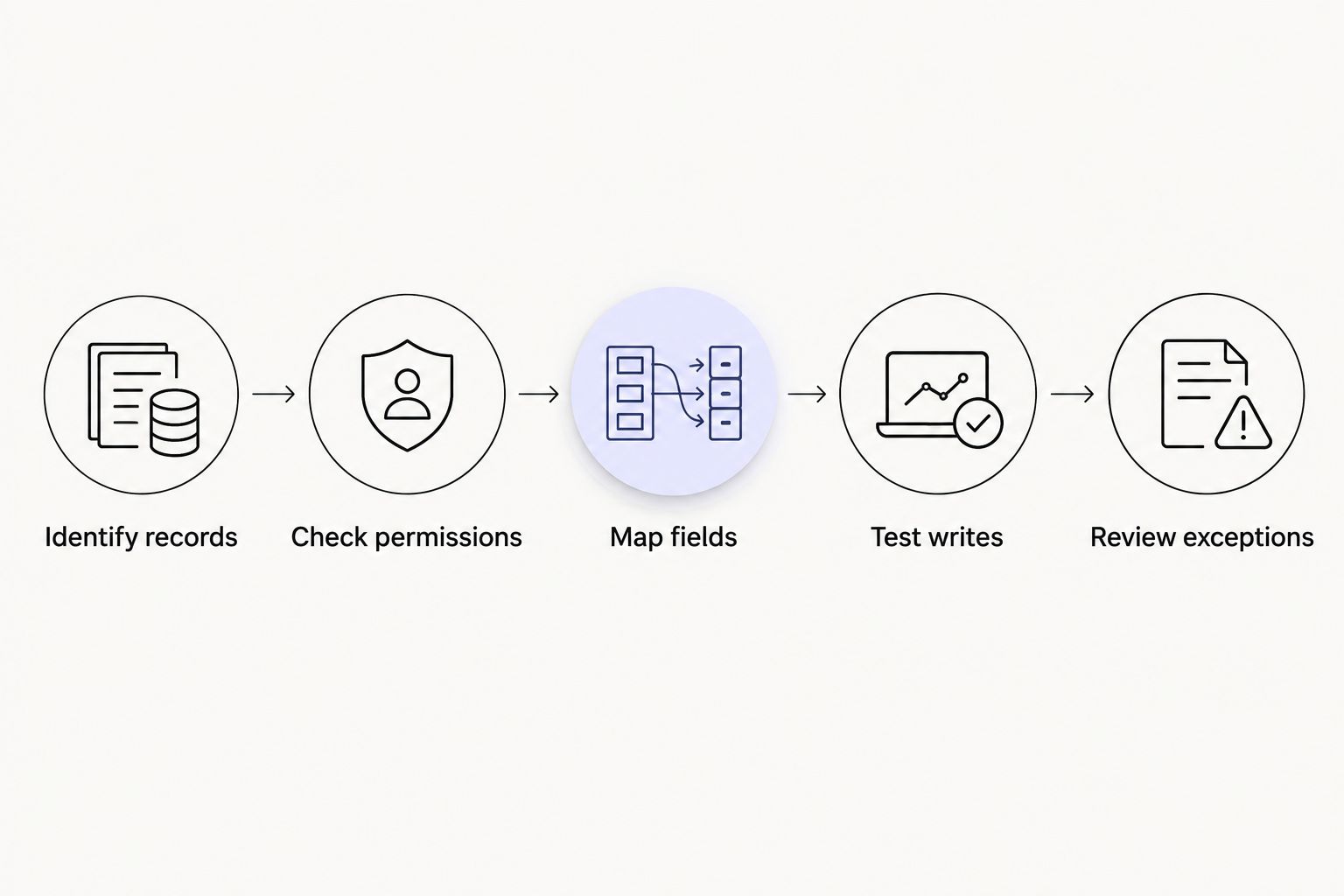
Keep a record of the test result in 2026. Note the destination, the field that changed and whether the reviewed version remained accessible. That gives advisers and compliance staff a shared answer to what the connection does, rather than separate assumptions about what sync means.
Why sync results vary
A yes-or-no answer changes with the workflow the firm expects. Check these drivers before comparing assistants:
- Destination system: Support for a CRM does not establish support for every practice management system. Ask about the firm’s exact system and configuration.
- Type of transfer: A stored transcript, a file note, a document and a task serve different purposes. Specify the output the adviser needs.
- Client matching: A note without a reliable client and meeting match still needs manual filing. Test ambiguous records rather than only clean examples.
- Permissions: The people allowed to read a transcript need not be the same people allowed to approve or change a client record. Set access for each action.
- Review process: A draft sent straight to a final file does not provide the same control as a reviewed note. Decide when approval occurs.
- Failure handling: If the destination rejects an update, the workflow needs a visible exception and a person responsible for resolving it.
These are evaluation criteria, not promises that a particular connector has every capability. In 2026, ask the provider to show the complete path from meeting to client file using the fields and approvals your firm requires.
What can go wrong even when a sync succeeds?
The most important failure is a plausible note in the wrong place. A transfer can complete while the information is attached to the wrong client, filed under an unexpected activity or left as an unreviewed draft. Check the destination record itself, not just a success message in the meeting assistant.
Duplication is another issue to test. If an adviser edits a note and sends it again, does the destination update the existing entry or create another one? Neither behaviour is inherently right. The firm needs to know which occurs so reviewers can identify the approved version.
Finally, separate a meeting summary from a compliance decision. A generated note can capture what was discussed. It does not, by itself, establish that advice documentation meets the firm’s requirements. Give the reviewer a way to correct omissions and distinguish an approved file note from material that is still being checked.
Can the assistant create tasks as well as meeting notes?
Yes, if the particular connection supports task fields and the firm has mapped them. Do not infer task sync from note sync. Test the task owner, due date field and client association separately; a useful task must appear where the team manages its work.
Does a CRM connection mean the full practice management workflow is covered?
No. A CRM connection establishes a route for the information that connection supports, not automatic coverage of documents, approvals and compliance records. Ask which records move, which remain in the meeting platform and which require a person to act.
Should advisers review notes before they sync?
Yes when the synced note will become part of the client file. Review lets an adviser correct attribution, clarify decisions and separate discussion from agreed action. In 2026, set the approval point before enabling a transfer into a final record.
FAQ
Can AI meeting assistants sync with practice management software?
Yes, when the meeting assistant and the firm’s chosen system support a compatible connection. Confirm the destination record, available fields and approval process for the exact systems involved.
Is CRM sync the same as practice management sync?
No. CRM sync describes a connection to a CRM, while the wider practice management workflow can include tasks, documents and record review. Check each required action rather than relying on the word sync.
Can meeting notes go straight into a client file?
They can if the connection supports that destination and the firm permits the transfer. Check client matching and whether the note arrives as a draft or an approved record.
Will a synced meeting note satisfy compliance requirements?
A synced note does not automatically satisfy a firm’s compliance requirements. The firm must assess the note, its approval status and the records it needs to retain.
What happens if a meeting note fails to sync?
That depends on the connection’s failure handling. Require a visible exception and an assigned person to correct the client file before relying on the workflow.
Can advisers edit a note after it has synced?
That depends on how the connection handles later edits. Test whether a correction updates the existing entry, creates another entry or stays only in the meeting assistant.
Is Alcova suitable for an advice firm that needs CRM sync?
Alcova provides meeting transcription, notes and CRM sync for wealth management firms. Confirm compatibility with your specific practice management system and the firm’s record approval process.
One last thing
Test the correction, not just the first transfer. In a 2026 evaluation, create a meeting note, review it, correct it and inspect the client record after each step. The result tells you more about day-to-day file noting than a successful initial sync. Alcova belongs on an advice firm’s shortlist for CRM-connected meeting notes and compliance records; the decision still rests on whether its connection fits the firm’s destination and controls.