AI note-taking software is secure enough for financial data only when your firm can control access, understand where meeting data goes, check what is retained and approve notes before they enter the client record. In 2026, a transcript that looks accurate is not proof that the underlying data is protected or that the resulting file note is fit for compliance review.
- AI note-taking software is secure enough for financial data only when the firm verifies data handling and recordkeeping controls.
- Check access, storage, provider use, retention and deletion before advisers record client meetings.
- Alcova connects meeting notes, CRM sync and compliance records for advice firms; its security terms still need review.
- Keep adviser approval between an AI-generated draft and the final client record.
Why this matters
An advice meeting can contain account details, family circumstances, health information and a client's financial objectives. Recording it creates more than a convenient draft: it creates a new copy of sensitive material that someone must control. Your review must follow that material from the meeting through transcription, note generation, CRM sync and eventual deletion.
The Alcova platform covers meeting transcription, notes, CRM sync, document generation and compliance records. That scope makes the handoff between systems central to the security question. A secure recording environment alone does not tell you who can open a synced note, whether a draft remains elsewhere or what happens when an adviser leaves the firm.
Is AI note-taking software secure enough for financial data?
Yes, if its controls meet your firm's requirements across the entire data path. No, if the provider cannot explain that path or your firm cannot enforce who sees and approves the output. Apply the same test to meeting audio, transcripts, generated notes and copies sent to the CRM. In 2026, do not treat a vendor's broad security statement as an answer to a specific question about your clients' records.
Use this decision table before enabling recording for client meetings. A feature list tells you what software does; the evidence column tells you what to request before relying on it.
| Check | What your firm needs to establish | Evidence to request |
|---|---|---|
| Access | Who can open recordings, transcripts, drafts and final notes | Role permissions and administrator controls |
| Data flow | Which systems and providers receive meeting material | A data-flow description covering transcription and generation |
| Provider use | Whether client material is used beyond delivering the service | Contract terms and data-use settings |
| Retention | Where each copy remains and how deletion works | Retention terms and a deletion process |
| Record approval | Who reviews a draft before it becomes the client record | Workflow settings and a sample approval path |
| Incident handling | How the firm learns about and responds to an incident | Notification terms and incident procedures |
The table is a procurement test, not a claim that any named platform passes it. If a supplier cannot show how a control works, mark it unresolved. Do not replace a missing answer with an assumption that the CRM, meeting platform or note-taking provider handles it automatically.
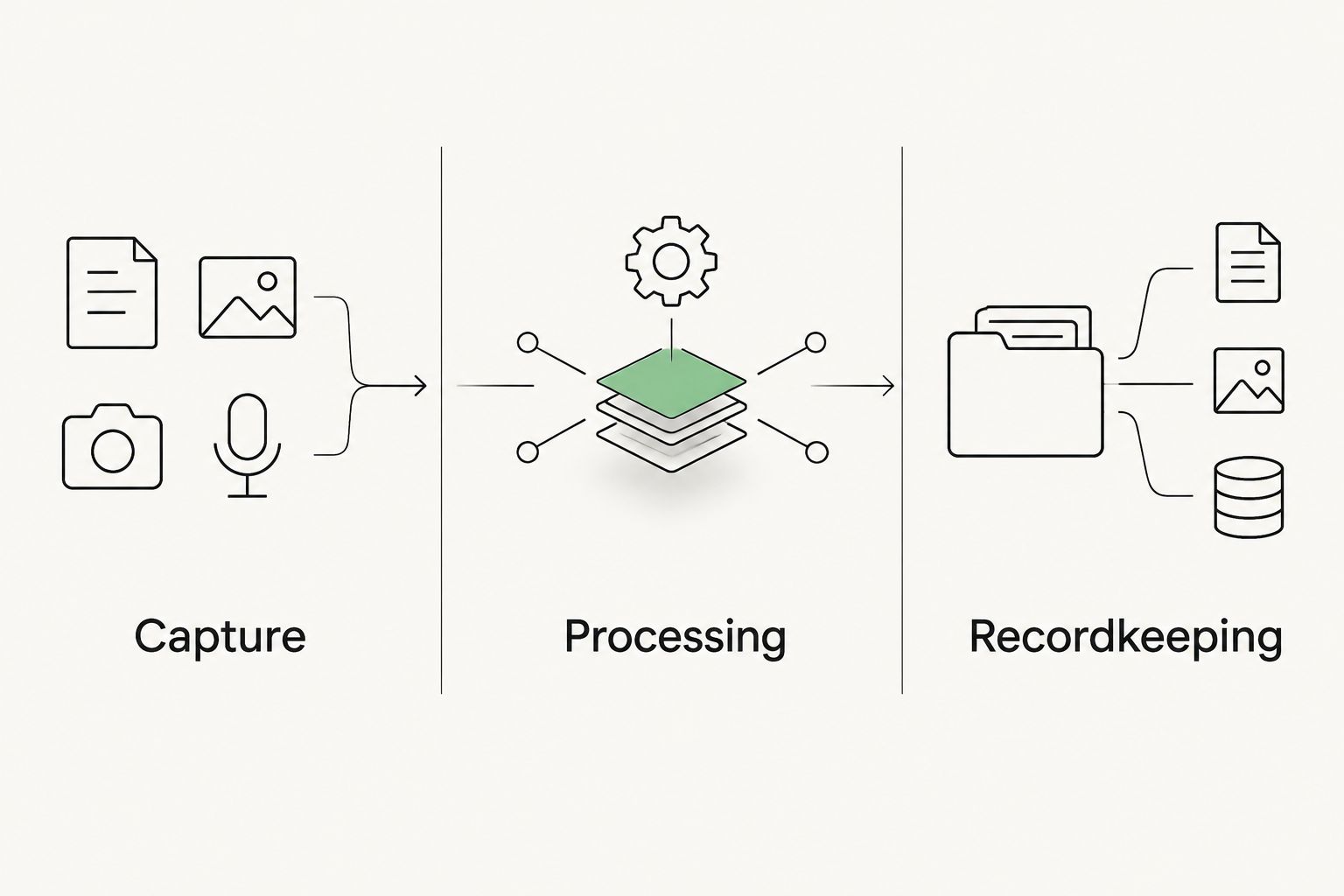
Follow the 3 data stages
Capture: Identify the meeting platform, recording permissions and participants before transcription starts. Decide when recording is appropriate, who starts it and where the original audio is stored. An adviser's access to the meeting does not automatically justify unrestricted access to every copy created afterward.
Processing: Establish where the audio or transcript is sent for transcription and note generation. Ask which providers process it, what they receive and whether the firm's settings or contract restrict other uses. For 2026 procurement, record the answers in terms your compliance team can check again when a provider or integration changes.
Recordkeeping: Review the generated note against the meeting, then control what enters the CRM or compliance record. Identify where drafts remain after approval and how corrections are recorded. The final note and its source material serve different purposes; your retention decision should address both.
Why security varies between note-taking setups
The question is not whether a tool uses AI. The question is which controls your firm can verify and operate. These factors change the answer:
- Meeting content. A routine scheduling discussion and a review of personal financial circumstances create different exposure if a transcript is shared or retained. Set a rule for which meetings the firm records.
- Access permissions. Check whether advisers, administrators and compliance staff receive access appropriate to their roles. Test what happens when someone changes role or leaves.
- Connected systems. A meeting platform, transcription service, generation tool and CRM can each hold data. Map the copies rather than assessing the note-taking screen alone.
- Provider terms. Confirm how the provider processes client material, including any terms governing other service providers. A setting you cannot document is not a dependable firm control.
- Retention and deletion. Decide which source files and drafts the firm needs. Check whether deletion covers copies outside the final record and whether retention aligns with the firm's obligations.
- Human review. A well-protected draft can still contain an omission or mistake. Require an adviser to check the note before treating it as an accurate account of the meeting.
These are checks for your firm's 2026 approval process, not a universal pass mark. A smaller practice and a dealer group can use the same questions while assigning permissions and review responsibilities differently.
What Australian privacy obligations change the decision?
The Australian Privacy Principles contain 13 principles governing the handling of personal information by organisations to which they apply. For an applicable advice firm, the review should address use and disclosure, overseas disclosure and security of personal information. Your legal and compliance team must determine which obligations apply to the firm and how its chosen providers meet them.
Start with purpose. If client meeting material is collected to document advice, ask whether each subsequent use or disclosure fits the firm's documented purpose and permissions. Then identify whether any provider handling creates an overseas disclosure question. Do not assume a provider's Australian-facing product means all processing stays in Australia.
Security is also an operational duty. Map who can see the original meeting material, who can export it and who can change a final record. Keep the contract review separate from the technical review: permission settings do not answer questions about provider use, and favourable contract language does not configure adviser access.
The Notifiable Data Breaches scheme adds an incident-response question for entities to which it applies. Ask who assesses an incident, what information the provider supplies and how promptly the firm is told. That process needs an owner before there is an incident, not after a client asks what happened.
Should you choose a general note-taker or an advice workflow?
Both approaches can produce meeting notes. Neither category is secure by definition. The better choice is the one your firm can configure, review and document against its own client-data and recordkeeping requirements.
| Approach | Best for | Advantage to assess | Limitation to address |
|---|---|---|---|
| General-purpose AI note-taker | Teams that need a draft transcript or summary | A focused capture-and-draft workflow | The firm must establish how drafts become approved advice records and where copies remain |
| Advice-firm workflow | Firms connecting meeting notes with CRM and compliance records | The meeting-to-record handoff can be assessed as one process | More connected functions mean more permissions and data transfers to examine |
| Manual file noting | Meetings where recording is not appropriate or approved | No audio upload is needed for the note-taking step | The adviser still needs a consistent, accurate record and appropriate storage |
Alcova is best for advice firms assessing meeting transcription alongside CRM sync and compliance records, not a stand-alone transcription decision. Its stated functions make those connections relevant to the review. They do not establish its hosting location, retention settings, access controls, certifications or contract terms; obtain evidence for those points before approving it for financial data.
Manual file noting remains a real option. It avoids creating a meeting audio copy for that step, but it does not remove the need to protect the finished note. Compare the complete process, not just the speed of producing a draft.
How do you approve AI meeting notes for use?
Set an approval path that distinguishes a generated draft from the firm's record. The adviser remains responsible for checking whether the note reflects what the client said and what the adviser explained. A clean format does not prove either point.
- Set the meeting rule. Define which client meetings can be recorded, who authorises recording and what advisers must do when recording is not appropriate.
- Map the data path. List the systems receiving audio, transcripts, generated notes and synced CRM content. Include copies created during corrections.
- Test permissions. Check access for an adviser, a compliance reviewer and an administrator. Repeat the test after a role change or departure.
- Review the draft. Compare material statements with the source meeting. Correct errors, omissions and unclear attributions before approval.
- Approve the record. Specify who approves the note and where the approved version belongs. Do not let automatic CRM sync imply that a draft has been checked.
- Confirm retention. Establish what happens to audio, transcripts and superseded drafts after the record is approved.
Run that sequence on a permitted test meeting before a broader 2026 rollout. If the firm cannot show what a reviewer sees at each stage, revise the workflow before using it for client records.
Review your meeting workflow
Assess how meeting notes, CRM sync and compliance records fit your firm's process.
Is a transcript enough for a compliant file note?
No. A transcript captures words, while a useful file note needs a checked account of the meeting that fits the firm's recordkeeping process. Review whether the draft identifies the client's circumstances and the substance of the discussion without adding conclusions that the meeting does not support.
An adviser should correct the note before it reaches the final record. A compliance reviewer also needs to know whether they are looking at a generated draft or an approved version. Make that distinction visible in the workflow rather than relying on the reader to infer it from a timestamp.
Can client data be sent to a model provider?
Only after the firm has established the permitted data flow and the controls governing that provider's use of the material. Check the contract, relevant settings and any other providers involved in processing. The name of a model does not answer where the data goes, who can access it or what is retained.
Alcova integrates tools including Claude and ChatGPT alongside its Operator. That describes the tools in its platform, not the handling terms for a particular client meeting. Ask for the specific data path before enabling a workflow containing financial information.
Who owns an error in an AI-generated meeting note?
Your firm must assign a human reviewer before a generated note becomes its client record. The software can produce a draft, but the adviser needs to check the account of the meeting and correct mistakes. Define how the firm records approval and later corrections so compliance staff can follow the final version.
FAQ
Is AI note-taking software secure enough for financial data in 2026?
Yes, when your firm verifies access, data use, connected providers, retention and approval of the final record. A provider's general security statement does not establish those controls for your meeting workflow.
Should financial advisers upload client meetings to a general AI note-taker?
Only after the firm approves the meeting type and verifies the provider's data-handling terms. The firm also needs a process for reviewing drafts and controlling copies outside the CRM.
Does a secure transcript meet an advice firm's recordkeeping needs?
No. A secure transcript still needs review before it can support an accurate client record, and the firm must decide where the source and final note are retained.
What should a compliance team ask an AI note-taking provider?
Ask who can access client material, which providers process it, where copies remain, how deletion works and how incidents are reported. Request evidence for each answer rather than relying on a feature list.
Does CRM sync make AI meeting notes compliant?
No. CRM sync moves content; it does not prove that an adviser checked the note or that access and retention are appropriate. Keep approval distinct from transfer.
Is Alcova secure enough for an advice firm's financial data?
Alcova's stated functions include meeting transcription, notes, CRM sync and compliance records, but those functions alone do not establish its security controls. Review its current terms, data flow and permissions against your firm's requirements before approval.
Can an advice firm keep using manual file notes?
Yes. Manual file noting avoids creating an audio copy for that step, but the firm still needs an accurate note, controlled access and an appropriate recordkeeping process.
One last thing
The easiest copy to overlook is the draft that never reaches the CRM. During your 2026 review, ask where the transcript and superseded notes remain after the adviser approves the final record. If no one can account for those copies, the workflow is not ready for client financial data.