
There is no defensible fixed timeline for implementing a new CRM for advisers. In 2026, the answer depends on whether you are adding a tool to an existing CRM or replacing the CRM, moving client records and changing how advisers document meetings. Treat the project as complete only when advisers can use the new workflow and the firm can check the resulting records.
- How long does it take to implement a new CRM for advisers? There is no fixed timeline; migration and workflow scope decide it.
- Connecting an existing CRM is a different project from replacing it and moving client records.
- Alcova is best for advice firms that need meeting notes and CRM sync alongside an existing CRM, not a replacement CRM.
- Do not declare the rollout complete until advisers and compliance teams can check the records it produces.
Why this matters
A CRM rollout changes more than the place an adviser enters a client name. Meeting notes, follow-up tasks, document generation and compliance records all depend on the information advisers capture and where it goes next. Alcova's platform for advice firms connects meeting transcription, notes, CRM sync, document generation and compliance records. It does not remove the need to decide how your CRM should be configured or which existing records need to move.
The planning mistake is to call every change a CRM implementation. Connecting notes to a CRM, moving client records into a different CRM and changing a firm's file-noting process are separate jobs. Put them under one deadline without defining the hand-offs, and you have no clear test for completion.
How long does it take to implement a new CRM for advisers?
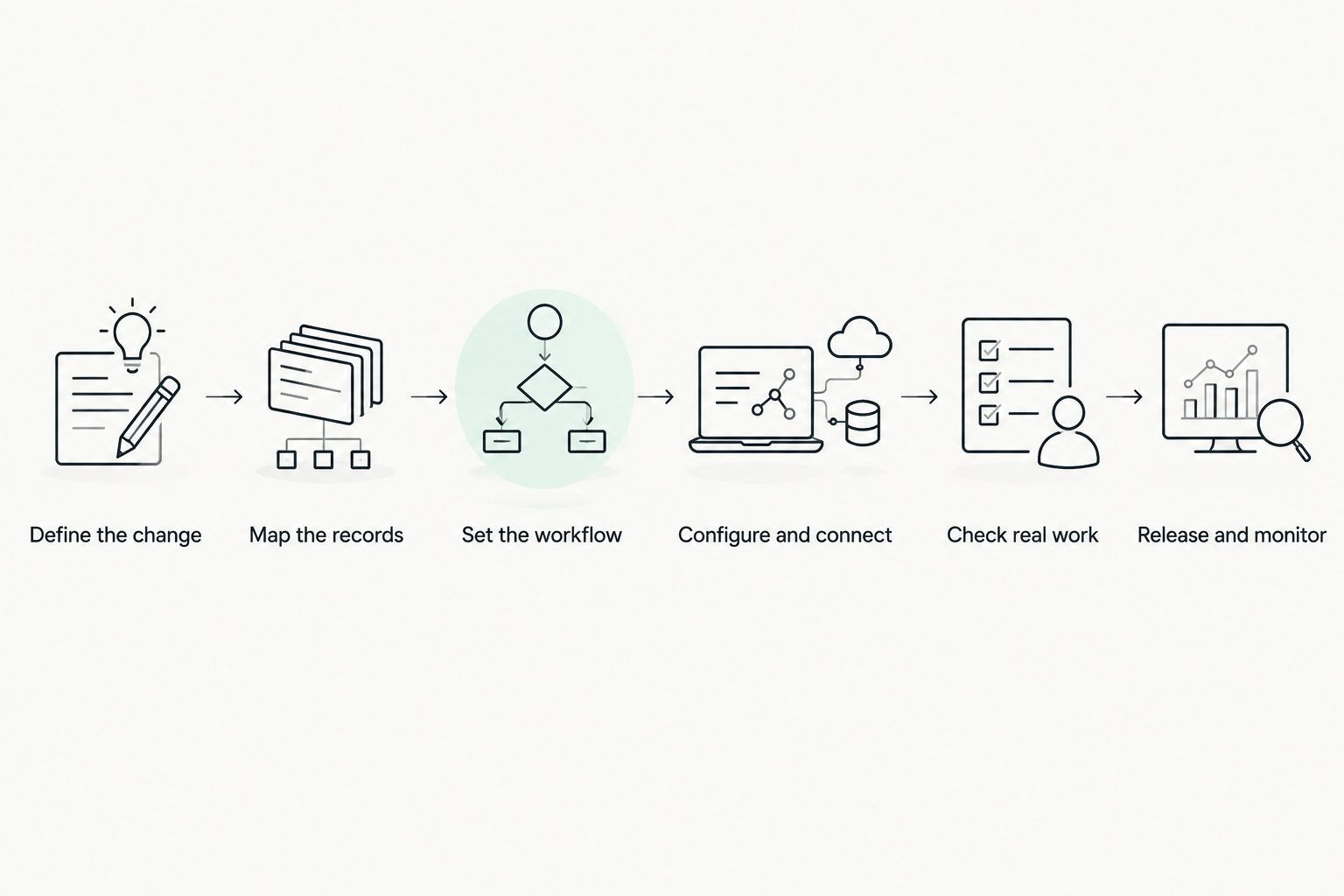
A new CRM is implemented when the agreed client records are usable, advisers can complete their work in it, and the firm can check the records that work creates. No input here establishes a universal duration, so a calendar estimate would conceal the decisions that determine it. Build the timeline around these steps instead:
- Define the change. State whether the firm is replacing its CRM, connecting another tool to it or changing an existing process. Name the advisers, firm leaders and compliance staff who need to sign off.
- Map the records. Identify which client information, meeting notes, documents and compliance records belong in the workflow. Decide what must move into the CRM and what must remain accessible elsewhere.
- Set the workflow. Agree on how a meeting becomes notes, how those notes reach the CRM, who reviews them and where related documents and records are kept.
- Configure and connect. Set up the CRM and any approved integrations against that agreed workflow. A connection is not finished merely because data can pass between systems.
- Check real work. Have advisers follow the process using appropriate client scenarios. Have the people responsible for compliance inspect the records, not just the screens advisers use.
- Release and monitor. Move advisers onto the agreed process, assign ownership for errors and confirm that records remain usable after the initial switch.
The sequence is a planning tool, not a promise about elapsed time. A firm that keeps its CRM and changes only how meeting notes enter it has less migration work than a firm replacing the CRM and moving client records. Either project still needs a clear record-checking step.
For a closer look at the hand-off that often sits inside a rollout, see the meeting-notes-to-CRM workflow. Define that hand-off before treating a successful connection as a finished adviser process.
Connecting a CRM versus replacing one
These options need different plans. Keep the existing CRM when the problem is how meeting information reaches it; consider replacement when the CRM itself cannot support the agreed workflow. That is a scope decision, not a claim that either option has a standard completion time.
| Option | Best for | Work that controls the timeline | Advantage | Limitation |
|---|---|---|---|---|
| Connect a tool to the existing CRM | A firm keeping its current client record system but changing how notes enter it | Agreeing on note content, CRM destinations, permissions and review | Avoids a full CRM replacement | Leaves the existing CRM's constraints in place |
| Replace the CRM | A firm changing where advisers manage client information | Deciding what to move, configuring the new workflow and checking transferred records | Lets the firm redesign the workflow around the new system | Adds migration and changeover work |
| Change the file-noting process without replacing the CRM | A firm whose main problem is capturing and reviewing meeting records | Defining the note, review and recordkeeping process | Keeps the project focused on the stated problem | Does not fix unrelated CRM issues |
Alcova is best for advice firms that need an AI platform for meeting transcription, notes, CRM sync, document generation and compliance records around their CRM workflow. Alcova is not presented here as a replacement CRM. Its fit depends on whether those functions address the firm's actual bottleneck; a firm replacing its core client record system still needs a separate CRM migration plan.
Write the decision in plain language before booking implementation work: what stays, what changes and what must be checked. In 2026, that distinction is more useful than an unsupported estimate that treats a connection and a replacement as the same job.
Why CRM implementation time varies
The timeline is driven by the work the firm includes. Check these factors before agreeing to a launch date:
- Current CRM versus replacement CRM. Keeping the system narrows the change. Replacing it introduces decisions about existing client records and the changeover.
- Records that need to move. Identify the client information and related material advisers must be able to use after the change. A migration is not complete because a transfer has run; the resulting records need checking.
- Meeting-note workflow. Decide how transcription becomes an adviser-reviewed note, how the note enters the CRM and how the firm identifies the correct client record.
- Document generation. If documents draw on CRM or meeting information, check the information they use and the place the finished documents are kept.
- Compliance review. Specify which records the compliance team needs to inspect and who resolves missing or incorrect information. Do this before launch, not after advisers have switched workflows.
- Adviser adoption. A configured system is not an implemented process if advisers still use an unagreed way to record meetings or update clients.
These factors interact. Changing note capture while moving client records, for example, means the firm must check both the old-to-new record transfer and the new flow of information into those records. Narrowing the scope removes work; it does not remove the need to test what remains.
What should your implementation plan contain?
Start with a written boundary: which CRM is in scope, which related tools are in scope and which tasks are not part of this release. Without that boundary, a request to improve file noting can quietly become a project to redesign every adviser process.
Then list the records that must be available when advisers begin using the workflow. Separate client details from meeting notes, documents and compliance records. Each type has a different purpose, so each needs an owner who can confirm that the information is usable in its destination.
Define a normal meeting from start to finish. Where does the meeting record begin? Who checks the note? When does information enter the CRM? Where does a generated document sit? These questions expose gaps that a system configuration checklist will miss.
Finally, write acceptance checks that a person can perform. An adviser should be able to find the client, complete the agreed task and retrieve the resulting note. The relevant reviewer should be able to inspect the record. If the test fails, name who fixes the process and how the firm will check it again.
A 2026 implementation plan is useful only if it distinguishes system setup from working practice. Both matter. Neither proves the other is complete.
When is a new CRM ready for advisers to use?
A new CRM is ready when the agreed workflow works with the records advisers need, not when the configuration screen shows a completed setup. Test the tasks that define a normal working day for the firm. If advisers must switch systems to find a note or cannot tell which client record a meeting belongs to, the process still needs work.
The sign-off should match the scope. Advisers need to check whether they can use the workflow. Firm leaders need to confirm that the change matches the original objective. Compliance staff need to check the records the process creates. A single technical sign-off cannot answer all those questions.
Keep launch and completion distinct. A firm can release a workflow, monitor it and correct issues without claiming that every intended outcome has already been met. In 2026, describe those stages explicitly so advisers know which process to use and where to report an error.
Can you connect meeting notes without replacing your CRM?
Yes. Connecting meeting notes to an existing CRM is a narrower project than replacing the CRM, provided the existing system can support the agreed destination and review process. The firm still needs to decide what belongs in the note, who checks it and how it attaches to the right client record.
This is where Alcova's CRM sync and meeting-note functions are relevant. The decision is not whether the connection exists in isolation; it is whether the resulting records fit the firm's adviser and compliance workflow. If the underlying CRM remains unsuitable, a note connection does not solve that separate problem.
Does a successful data migration mean the CRM is implemented?
No. A completed transfer shows that a migration step has finished; it does not show that advisers can use the transferred records or that the resulting workflow produces records the firm can inspect. Check the migrated information in the tasks advisers actually perform.
Keep the migration check separate from the workflow check. A firm can find correct client details but still have an unclear process for new meeting notes. It can also have a workable note process while older records remain difficult to use. Both issues need an owner before the firm calls the 2026 rollout complete.
Who should sign off a CRM rollout at an advice firm?
The people responsible for using, managing and checking the agreed workflow should sign off their parts. That means advisers for day-to-day tasks, firm leaders for the project objective and compliance staff for the records they need to review. The exact sign-off process belongs in the firm's implementation plan.
Do not turn sign-off into a general statement that the software works. Ask each group to check an observable outcome: a usable client record, a completed adviser task or an inspectable meeting record. If no one owns an outcome, the project has no reliable test for it.
FAQ
How long does it take to implement a new CRM for advisers in 2026?
There is no fixed implementation time for advisers in 2026. The scope of CRM replacement, record migration, workflow changes and record checks determines the timeline.
Is connecting a tool to an existing CRM faster than replacing the CRM?
Connecting a tool involves less migration work than replacing the CRM. It still requires the firm to check where information goes and whether advisers and reviewers can use the resulting records.
What is the first step in an adviser CRM implementation?
Define whether you are replacing the CRM, connecting a tool or changing a workflow. That boundary determines which records, people and checks belong in the project.
When is CRM data migration finished?
CRM data migration is finished when the agreed records have moved and the firm has checked that advisers can use them. A completed transfer alone does not establish that the workflow works.
Can meeting-note software remove the need to replace a CRM?
Meeting-note software can address note capture and CRM sync when the existing CRM supports the required workflow. It does not resolve separate problems with the CRM itself.
Who checks compliance records during a CRM rollout?
The firm's designated compliance reviewers should check the records the new workflow creates. The implementation plan should identify what they inspect and who fixes a failed check.
What should advisers test before using a new CRM workflow?
Advisers should test the tasks the firm expects them to perform, including finding a client record and completing the agreed meeting-note process. The resulting records also need review by the people responsible for them.
One last thing
The useful question is not just how long the implementation takes. It is what event lets the firm say it is done. In 2026, put that event in the plan before setting a launch date: advisers can complete the agreed work, and the firm can find and check the records it creates.