
Client onboarding with software takes as long as the firm needs to collect client information, complete its checks, prepare advice documents and obtain any required approvals. Software can shorten the handling between those steps, but it cannot set a reliable end-to-end duration when client responses and review times are unknown. For an Australian financial advice firm in 2026, measure the time from the first client request to the point your firm defines as ready to advise, not just the time spent entering data.
- There is no fixed answer to how long does client onboarding take with software; client responses and firm approvals determine completion.
- Alcova is best suited to advice firms connecting meeting notes, CRM sync and compliance records, not firms seeking a promised onboarding time.
- Track client waiting time separately from adviser work and compliance review before judging whether software speeds up onboarding.
Why this matters
A firm can make its internal handoffs faster and still leave a new client waiting for a document request, a follow-up meeting or a compliance decision. That is why an onboarding time quoted without a start point, an end point and a record of waiting time tells you little about how the process works.
In 2026, the useful question for firm leaders is not whether software makes onboarding instant. It is which part of the journey the software changes. Alcova provides an AI platform for meeting transcription, notes, CRM sync, document generation and compliance records. Those functions address work that follows a client conversation; the firm still needs to identify which onboarding tasks and approvals sit outside that flow.
How long does client onboarding take with software?
There is no defensible universal number of hours or days. The answer depends on the firm's definition of onboarding, the information it needs from the client, its review process and the way its systems pass work between people. A stopwatch that starts after all documents arrive excludes a delay the client experienced. A stopwatch that ends when a CRM record is created excludes work the firm still has to finish.
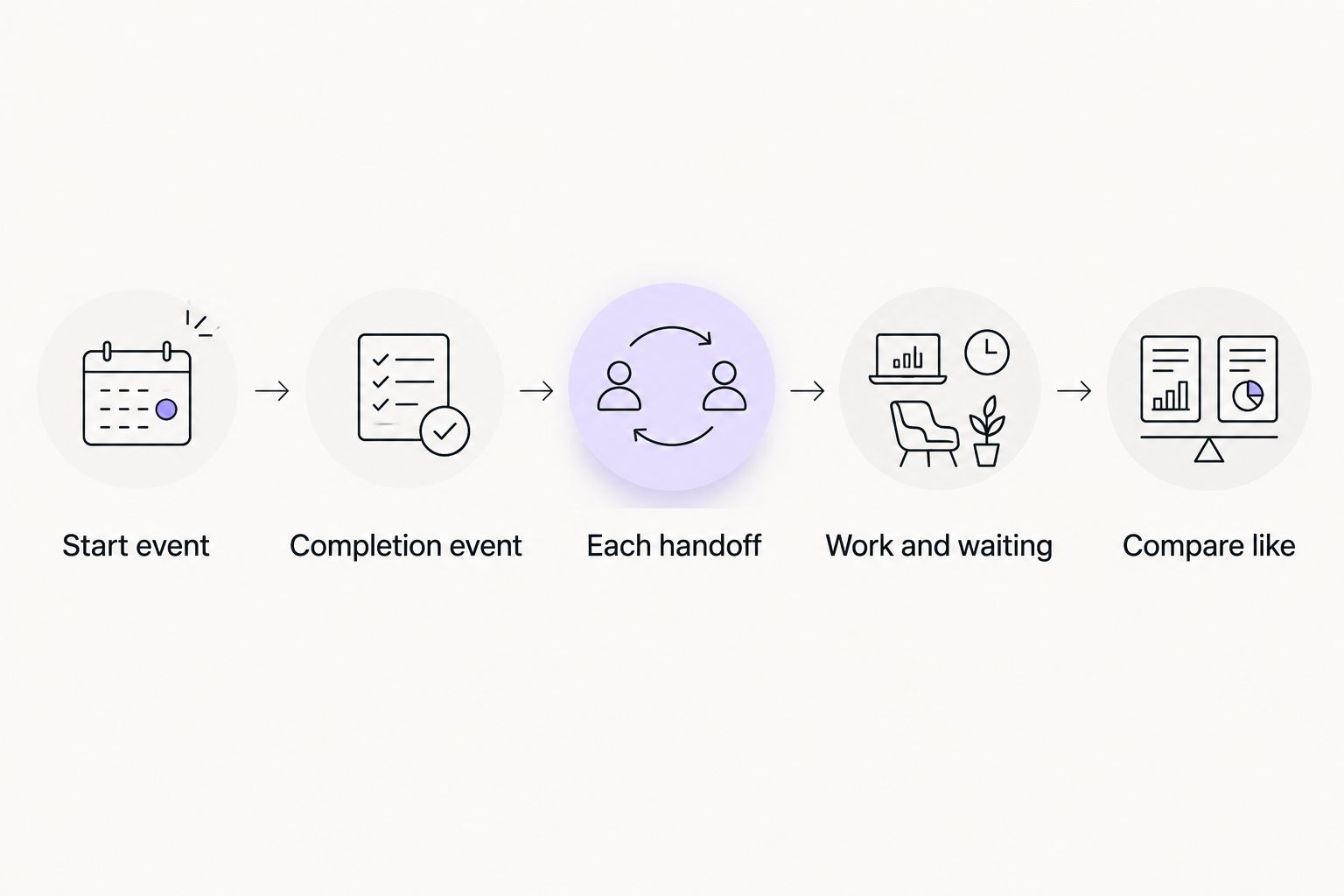
For an advice firm, use a consistent sequence before comparing software or setting a target:
- Set the start event. Choose the first event your firm treats as an onboarding request. Record it consistently rather than starting the clock when an adviser finds time to open the file.
- Set the completion event. Decide whether onboarding ends when information is collected, checks are complete, the client is ready for an advice meeting or the firm is ready to provide advice. These are different endpoints.
- Record each handoff. Mark when a task moves to the client, adviser, operations team or compliance team. A task cannot be credited to software when it is waiting for a person to act.
- Separate work from waiting. Keep time spent preparing or reviewing records apart from time spent waiting for information or a decision. Total elapsed time matters to the client; active work matters when assessing an internal tool.
- Compare like with like. Apply the same start event, endpoint and handoff definitions before and after a software change. Otherwise, a shorter reported time can be a change in measurement rather than a change in service.
That sequence gives you an answer for your firm. It also gives advisers a clearer explanation for clients: what has been completed, what is waiting and who owns the next action.
What should the clock include?
Include every interval between the agreed start and completion events in the client-facing measure. Then classify the intervals so the firm can act on them. An adviser drafting a note, a client returning information and a compliance reviewer checking a file all contribute to elapsed time, but they call for different fixes.
Do not erase waiting time simply because it sits outside the software. If a request leaves the firm and the client has not responded, that still affects when onboarding finishes. Equally, do not blame a transcription or CRM tool for a decision that belongs to the firm's review process. Elapsed time tells you what the client experienced; task-level time tells you what to change.
What software can shorten
Software is most relevant when people repeat or transfer information: turning a meeting into notes, adding those notes to the CRM, preparing a document from available information or keeping the associated record accessible for review. These are distinct tasks. A faster note does not mean a completed client file, and a synced CRM entry does not mean an approval has been granted.
Map each task to the person who owns it before selecting a tool. If advisers still have to check a note, correct missing details and approve a document, include that work in the process. Automation changes where effort occurs; it does not remove responsibility for the record.
What software cannot put on a fixed timer
Client replies, missing information and firm decisions have no duration supplied by a software feature list. The firm can make requests clear and assign owners, but it should not promise a completion time it has not measured against its own cases. In 2026, treat any vendor's speed claim as a claim about a named task unless it specifies the full start-to-finish journey and what it excludes.
This distinction matters when one product covers scheduling, another captures meetings and a third stores client records. Adding their advertised time savings together does not produce an onboarding duration. The same handoff can appear in more than one product's account of the process.
Why onboarding time varies
- The completion definition. Collecting client details is a narrower endpoint than finishing every step needed to begin advice. Agree on the endpoint before reporting a duration.
- The client's response. Missing or unclear information leaves a task with the client, regardless of how quickly software sends a request.
- The firm's review path. An adviser, operations team and compliance team can each have a different decision to make. Track the point at which each receives and returns the work.
- Record quality. A transcript, note or document that needs correction remains work in progress. Count the review rather than stopping the clock when a draft appears.
- CRM handoffs. If meeting information needs to move into a CRM, distinguish a completed sync from an entry that still needs checking or updating.
- The mix of new and existing clients. An existing record and a first-time client request do not begin with the same information. Report them separately rather than treating their elapsed times as interchangeable.
These factors give a firm a way to diagnose delay without assigning every delay to software. They also prevent a single unusually simple case from becoming the benchmark for all new clients.
How should an advice firm measure the software's effect?
Start with a case-level record of the events already named: request received, information requested, information returned, meeting completed, notes reviewed, CRM updated, documents reviewed and the firm's chosen completion event. Use only events that actually occur in your workflow. The purpose is to see where a case waits, not to add tracking work that slows it down.
Next, give each interval an owner. Adviser work and compliance review are not interchangeable, even when both take place inside the same system. If a task returns for correction, retain that handoff in the record. Removing rework from the measurement makes the process look shorter without changing it.
Finally, compare cases that follow the same route. If one group requires another meeting or a different review path, show that difference. In 2026, a useful internal report separates total elapsed time, active firm work and client waiting time. It does not collapse them into a single claim that the software made onboarding faster.
For financial advisers evaluating a platform, ask the vendor to show the point where meeting content becomes a reviewed note, the point where that note reaches the CRM and the point where a compliance record is available. Ask who checks each output. A demonstration that skips those transitions cannot establish what happens to your firm's onboarding time.
Where Alcova fits in the process
Alcova is best suited to wealth management firms that need meeting notes, CRM sync, document generation and compliance records connected to adviser work. Its stated scope covers meeting transcription and notes alongside those downstream records. That makes it relevant when your measured delay sits between a client conversation and the firm's usable record.
The limit is equally clear: Alcova's listed functions do not establish how long a client takes to respond or how long your firm takes to approve a file. Evaluate the platform against the tasks it addresses, then measure the full onboarding journey separately. Do not turn a faster meeting-to-record workflow into an unsupported promise about the time it takes to onboard a client.
For a 2026 comparison, put each candidate through the same example from your firm's process. Check what information enters the system, where an adviser reviews it, what reaches the CRM and which records the compliance team can inspect. Record manual steps as well as automated ones. The better fit is the option that removes a handoff your firm actually struggles with while preserving the checks it needs.
Can software finish onboarding before the client responds?
No: software cannot complete a step that requires information the client has not supplied. It can support the firm's side of the exchange, but elapsed time continues while the case waits. If client responses account for the delay, changing a meeting-notes tool will not answer that problem.
The practical fix is to make the missing item and its owner visible. Keep the client-facing clock running, and report waiting time separately. That preserves an honest account of the experience while showing where the firm has control.
Does a completed CRM entry mean onboarding is complete?
No: a completed CRM entry is only the endpoint if your firm explicitly defines it that way. The file can still need a document, a review or another decision. In 2026, use a completion event that matches what the firm has promised to do, not whichever system shows the earliest finished status.
A CRM is valuable as a record of the client and the work attached to them. It does not settle whether every required onboarding task is done. Name the remaining tasks in the workflow so an adviser does not mistake a synced note for a finished case.
How do you compare onboarding tools on speed?
Compare the time each tool changes within the same defined workflow, not a claimed end-to-end duration. Note where the tool begins work, where a person checks its output and where the next team receives it. A product that shortens note preparation and one that handles a different handoff should not be scored as though they perform the same job.
Use your firm's own case records for the final judgement. In 2026, the relevant result is whether the selected tool changes a measured delay without obscuring client waiting, adviser review or compliance work.
FAQ
How long does client onboarding take with software?
There is no fixed onboarding duration that software can establish for an advice firm. Measure from a defined client request to a defined completion event, including client waiting and firm review.
Does onboarding software make client responses faster?
Onboarding software does not determine when a client responds. Keep client waiting time in the elapsed-time measure and separate it from work the firm controls.
What counts as the end of client onboarding for a financial adviser?
The end is the completion event your firm defines for its process. A collected form, a CRM entry and a file ready for advice are different endpoints, so use one consistently.
Can meeting transcription reduce onboarding time?
Meeting transcription addresses the capture of a conversation, not the entire onboarding journey. Include note review, CRM handoffs and any remaining firm checks when measuring its effect.
Is CRM sync the same as completing onboarding?
No, CRM sync records or transfers information; it does not establish that every onboarding task is finished. Check the firm's remaining document and review steps before closing the case.
How should a firm compare onboarding software in 2026?
Compare tools against the same start event, completion event and set of handoffs. Record both manual review and waiting time so a quicker task is not mistaken for a quicker client journey.
What should compliance teams check in an onboarding workflow?
Compliance teams should check where records are created, who reviews them and how the firm identifies incomplete work. A generated note is an output to assess, not proof that the whole file is complete.
One last thing
The quickest-looking workflow can be the one that stops its clock earliest. Before accepting any 2026 onboarding-speed claim, ask what happens after the reported endpoint. If advisers still need to check notes, update the CRM or obtain a decision, the client journey has not become shorter just because the software's task has ended.