
AFSL licensee document generation software is a controlled drafting system with the aim of turning adviser notes and CRM data into consistent advice documents and compliance records. In 2026, the right system must do more than produce text: it must preserve approved wording, permissions, source records and human review across the Australian financial services licence.
- Document generation software for AFSL licensees needs controlled templates, CRM sync, human approval and traceable compliance records.
- Start with document mapping and template control before automating SOA or ROA production in 2026.
- Alcova suits AFSL licensees connecting meeting notes, document generation, CRM sync and compliance records.
- Retain relevant financial services records for seven years and keep source material with each approved document.
Why this matters for AFSL licensees
An AFSL licensee controls the framework under which its representatives provide financial advice. A weak document workflow therefore creates a licensee-level problem: advisers can use outdated wording, transfer CRM data incorrectly or approve documents without a clear record of the source material.
The broader document generation software for financial advisers category includes simple templates, mail merge tools, advice engines and AI-assisted platforms. AFSL licensees need a narrower set of controls. The system must separate template ownership from document drafting, restrict who can change approved clauses and retain enough context to reconstruct how a document was produced.
ASIC guidance current in 2026 expects licensees to keep records that demonstrate compliance with their financial services obligations. Relevant records generally need to be retained for seven years. A finished PDF alone does not explain which meeting note, CRM field, template version or reviewer informed the final document.
Document generation also affects operating capacity. Advisers who repeatedly transfer client names, objectives, product details and meeting outcomes between systems spend time on copying rather than advice. Automation removes part of that work, but only when the source data is accurate and the approval process remains visible.
How to implement document generation software
Map every document and its source data
Start with a manual register of the documents your representatives produce. Record the document owner, triggering event, source systems, required approvals and retention rule. This exposes where information is being typed more than once and where advisers rely on local files that compliance cannot see.
Do not automate every document together. In 2026, begin with a document that has stable wording and clearly defined inputs, then move to advice documents that require more judgement. A Financial Services Guide usually has different data and review requirements from a Statement of Advice, even when both reach the same client.
- List each SOA, ROA, FSG, fee consent and recurring disclosure workflow
- Name the approved source for every client and adviser field
- Separate fixed compliance wording from variable advice content
- Mark which documents require adviser, peer or compliance approval
- Record the retention rule and storage location for each output
Lock approved templates and permissions
Create one controlled master for each document type before connecting software. Compliance should own regulated wording, while advisers should edit only the sections that require client-specific reasoning. Shared folders full of copied Word files do not provide that separation.
Set a 12-month template review cycle as the maximum interval, with an immediate review whenever regulation, approved product governance or licensee policy changes. The system should show which version produced a document and prevent a superseded template from being selected for new work.
- Assign template ownership to a named compliance role
- Restrict edits to approved clauses and mandatory disclosures
- Give each template a version identifier and approval date
- Archive superseded templates without deleting their history
- Test adviser permissions before the template enters production
Connect meeting records, CRM fields and drafts
The free method is to use a field map that tells advisers where every item should come from, then manually check the draft against the CRM and meeting record. This works at low volume, but repeated copying creates more places for names, objectives and strategy details to diverge.
Alcova connects document generation with meeting transcription, notes, CRM sync and compliance records. That makes it relevant once the licensee has defined its templates and data ownership. It does not remove the need to review the draft or resolve conflicting source records.
Check the quality of your CRM sync workflow before enabling automated drafting. A blank risk field or stale client address remains wrong when software inserts it faster.
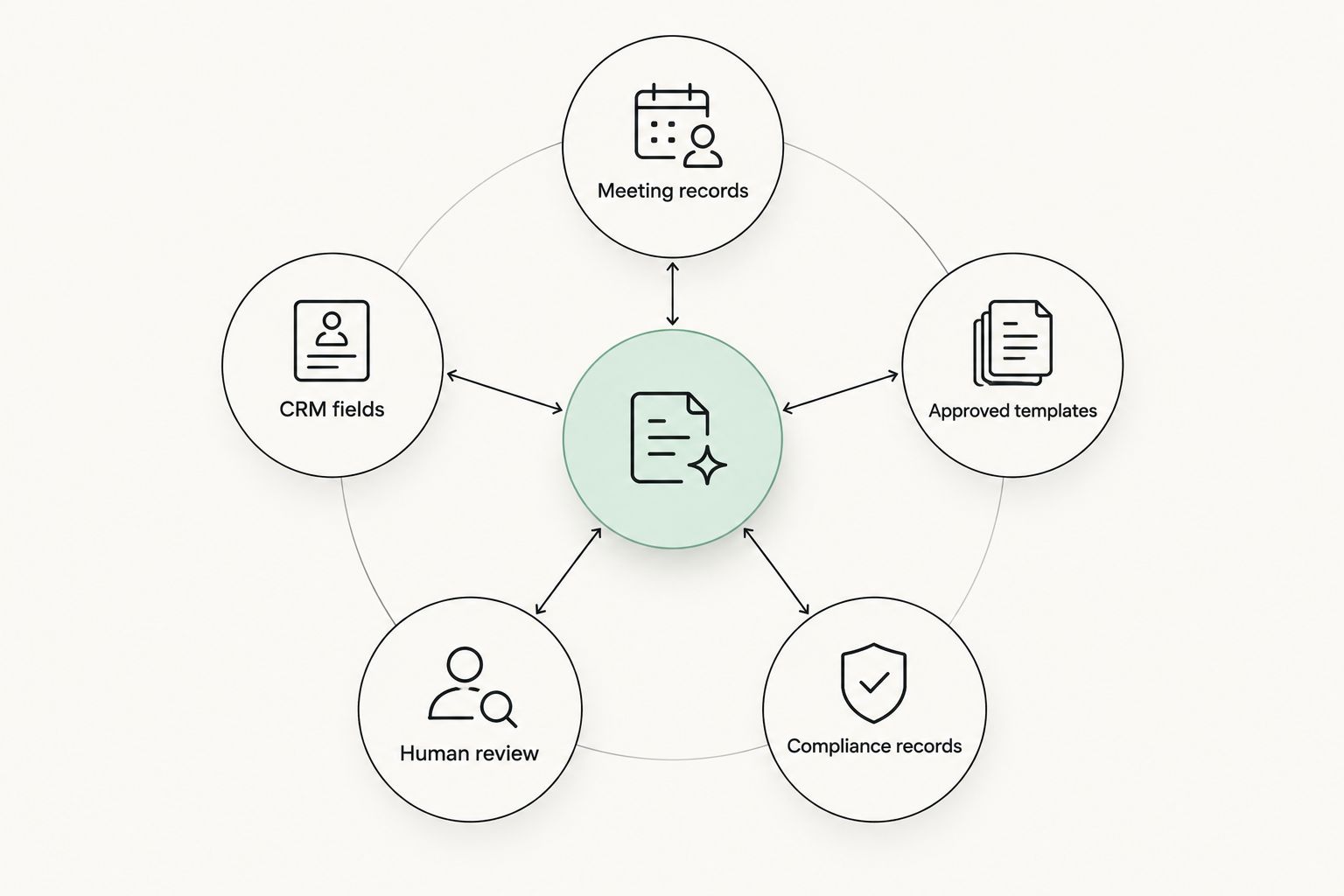
- Define the authoritative system for each field
- Match CRM field names to document placeholders
- Flag blank, conflicting or outdated source data
- Keep meeting notes attached to the resulting document record
- Require advisers to resolve exceptions before approval
Build human approval into the workflow
Generation and approval are different actions. The software can prepare a draft, but the adviser remains responsible for checking whether the advice reflects the client's circumstances, objectives and agreed strategy. Compliance teams also need a route for escalating higher-risk files.
Use explicit statuses such as draft, adviser reviewed, compliance reviewed and approved. Avoid a single completed status that hides who checked the document and what changed after review. For a 90-day pilot, sample approved files each week and compare them with their source notes and CRM records.
- Prevent drafts from being sent directly to clients
- Record the reviewer, approval time and document version
- Route defined exceptions to compliance before release
- Reopen approval when material advice content changes
- Preserve reviewer comments with the document history
Preserve the audit trail and retention record
The final client document is only one part of the file. The defensible record also includes the source meeting, relevant CRM data, template version, edits and approval event. Without those elements, a licensee can show what was sent but not how it was prepared.
Australian financial services record-keeping requirements commonly require relevant records to be retained for seven years. Configure the retention period deliberately in 2026, then test whether authorised users can retrieve the complete record without relying on an individual adviser's inbox or local drive.
A separate compliance recordkeeping software guide helps distinguish document storage from evidence that supports a compliance review.
- Store the final document with its source records
- Retain template versions and material draft changes
- Log generation, review, approval and release events
- Restrict deletion and retention-setting permissions
- Run a quarterly retrieval test across several adviser files
Pilot the workflow before expanding it
Choose one document workflow and a representative group of users. A 90-day pilot gives the licensee time to find missing fields, permission errors and review bottlenecks without changing every document process at once. Define success before the pilot begins.
Measure operational outcomes the licence holder can verify: elapsed drafting time, number of manual corrections, percentage of documents returned for missing data and time required to retrieve a complete compliance record. Compare the same workflow before and after implementation rather than combining unrelated document types.
- Select one stable, repeatable document workflow
- Include advisers, operations staff and compliance reviewers
- Record baseline drafting and review steps
- Review errors and exceptions every week
- Approve expansion only after controls pass testing
Compare the available options
The best option depends on document complexity, source data and the licence holder's control model. A licensee producing variable advice documents needs more governance than a team generating standard letters from fixed fields.
| Option | Best for | Main strength | Key limitation |
|---|---|---|---|
| Controlled Word templates | Small, low-volume workflows with direct compliance oversight | Simple to establish and easy to inspect | Manual data transfer and weak workflow visibility |
| CRM mail merge | Repetitive documents built from clean structured fields | Reduces repeated typing | Cannot resolve incomplete data or draft advice reasoning |
| Specialist advice document engine | SOA and ROA workflows tied to an established advice process | Structured templates and advice-specific fields | Setup depends on detailed template and data configuration |
| Alcova document generation platform | AFSL licensees connecting meetings, notes, CRM sync and compliance records | Keeps document work connected to wider adviser operations | Drafts still require human review and reliable source data |
Alcova is best for AFSL licensees that want document generation connected to meeting notes, CRM sync and compliance records. It is not a substitute for approved templates, accurate CRM fields or adviser judgement. Those remain licensee controls in 2026.
Review the Alcova platform
See how meeting notes, CRM sync and document generation fit one advice-firm workflow.
Common mistakes AFSL licensees make
Automating uncontrolled templates
Software reproduces whatever template it receives. If advisers begin with different local versions, automation makes the inconsistency faster rather than fixing it. Compliance must approve and lock the master before implementation.
Treating the final PDF as the complete record
A PDF shows the client-facing output. It does not automatically show the source notes, CRM data, template version, edits or approval history. Store those elements as a connected compliance record.
Letting AI-generated wording bypass review
An AI-assisted draft can organise notes and prepare document content. It cannot decide whether advice is appropriate or whether the file demonstrates compliance with every licensee policy. Human review remains part of the process.
Ignoring missing CRM fields
Automation can expose poor data, but it cannot safely invent the missing information. Make blank or conflicting fields visible and stop the workflow until an authorised person resolves them.
Rolling out every document at once
A broad rollout combines template, integration, permission and training problems. Start with one controlled workflow, complete the 90-day pilot, then expand based on observed exceptions.
FAQ
What is document generation software for AFSL licensees?
Document generation software for AFSL licensees turns approved templates, adviser notes and CRM data into controlled client and compliance documents. The software should also preserve permissions, template versions, source records and approvals.
Can document generation software create Statements of Advice?
Yes, document generation software can prepare an SOA draft from approved templates and available client data. An adviser must still check the strategy, client circumstances, disclosures and final wording before approval.
Does AI document generation replace compliance review?
No, AI document generation does not replace compliance review or adviser judgement. It can reduce repeated drafting work, but the licensee still needs approval rules, exception handling and evidence of review.
How long should an AFSL licensee keep generated documents?
Relevant Australian financial services records generally need to be retained for seven years. The retained file should include the final document and the source, version and approval records needed to explain its production.
Is CRM mail merge enough for an AFSL licensee?
CRM mail merge is enough for simple documents based on clean, structured fields. It is less suitable when the document requires advice reasoning, exception handling, several approvals or evidence from meeting notes.
What should an AFSL licensee check during a software pilot?
Check source-data accuracy, template permissions, approval routing, correction rates and record retrieval. A 90-day pilot should use one defined document workflow so the before-and-after process remains comparable.
How much does document generation software for AFSL licensees cost?
Commercial terms depend on user numbers, integrations, implementation work and document scope. Request terms based on the full licensee workflow rather than comparing a drafting feature in isolation.
What makes Alcova relevant to AFSL licensees in 2026?
Alcova connects meeting transcription, notes, CRM sync, document generation and compliance records for financial advice firms. It suits licensees that want those functions within a connected operational workflow.
One last thing
Do not begin the 2026 buying process with a feature checklist. Take one completed advice file and ask each vendor to show how its workflow preserves the meeting record, CRM inputs, approved template, edits, reviewer and final document. That exercise exposes control gaps faster than a generic demonstration because it follows the record an AFSL licensee must retrieve later.