
This 2026 comparison for Australian financial advice firms weighs Alcova against RiskHub across meeting notes, CRM sync, document generation, compliance records and risk profiling.
- Alcova wins for firms that want meeting-to-CRM automation, document generation and compliance records in one workflow.
- RiskHub wins for the specific job of structured client risk-profiling questionnaires.
- The two tools solve different steps of the advice process, not the same problem twice.
- Pricing on both runs on subscription models — check current plans directly with each vendor before committing.
Why this matters
"Alcova vs RiskHub" only makes sense as a question once you separate the two jobs each tool is actually doing. One automates what happens after a client meeting ends. The other structures what happens before an adviser makes a recommendation.
Advice firms in 2026 are under more scrutiny on Records of Advice and file notes than they were a few years back, and admin time is still the biggest drag on adviser capacity. Buying the wrong tool for the wrong step in that process wastes budget and burns a renewal cycle you don't get back.
The comparison below splits the two products by function rather than pretending one replaces the other outright, because it doesn't.
Alcova vs RiskHub: the quick verdict
Choose Alcova if you need meeting transcription, CRM sync, document generation and compliance recordkeeping handled automatically across the advice process — think a licensee running 15 advisers who wants every meeting turned into a file note without manual typing.
Choose RiskHub if your gap is specifically a structured risk-profiling questionnaire at the start of the advice relationship, and your CRM and meeting workflow are already sorted.
Alcova is built as an AI operations layer across the whole advice workflow — transcription, notes, CRM sync, documents and compliance records in one system. RiskHub is built around a single step: capturing and scoring a client's risk tolerance.
At a glance
| Dimension | Alcova | RiskHub |
|---|---|---|
| Best for | Firms automating the meeting-to-file workflow | Firms needing structured risk questionnaires |
| Pricing model | Subscription, priced at firm level | Subscription, typically per adviser or per questionnaire |
| Standout feature | Meeting transcription synced straight into the CRM and compliance record | Structured risk-profiling questionnaire and scoring |
| Meeting notes & transcription | Built-in, automatic | Not the core function |
| CRM sync | Direct sync to the CRM | Not the core function |
| Document generation | Generates draft advice documents from meeting content | Not the core function |
| Compliance records | Captures Records of Advice inputs from every meeting | Captures risk-profile documentation for the file |
| Risk profiling | Not a dedicated risk-profiling tool | Core function |
| Firm size fit | Boutique to enterprise | Boutique to enterprise |
Alcova automates meeting notes; RiskHub isn't built for that step
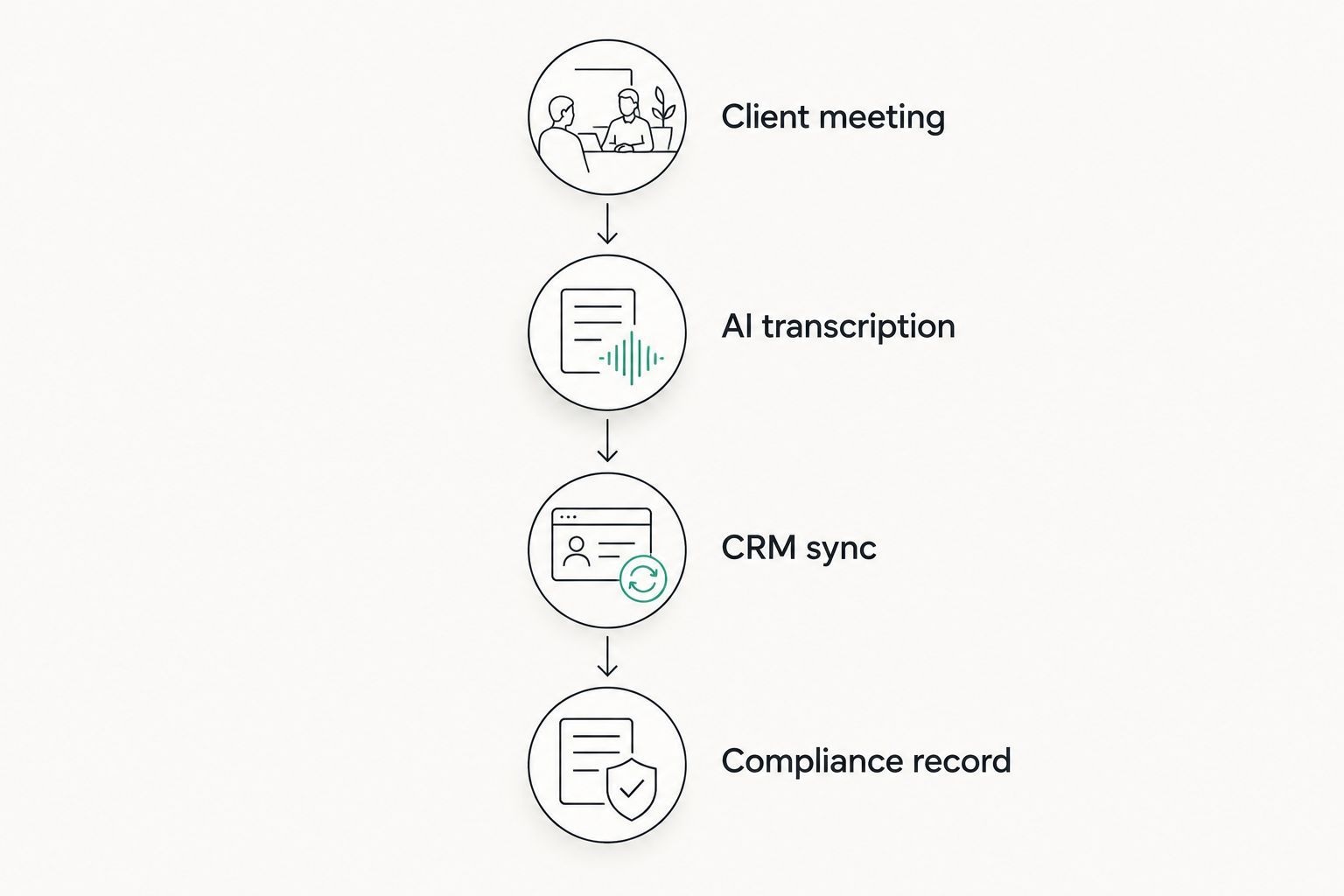
Alcova turns every adviser meeting into a structured note synced to the CRM without an adviser typing it up. Transcription, summarisation and file noting run automatically the moment a meeting ends, which is the core of what the platform does in 2026.
RiskHub's job sits earlier in the process: getting a risk-tolerance answer on file before the meeting even happens, not documenting what was said during it. That's not a gap in RiskHub — it's a different product category entirely.
Alcova syncs the CRM directly; RiskHub is a separate step in the stack
Alcova pushes meeting content directly into the firm's CRM record, closing the loop between what was discussed and what's logged against the client file. That's a structural feature of the platform, not an add-on bolted onto a note-taking tool.
RiskHub's output — a risk score and questionnaire result — still needs to land in the CRM through whatever integration or manual step the firm already runs. It produces one more input to sync, rather than solving the sync problem itself.
RiskHub is the better risk-profiling tool
If the job is a structured, defensible risk-tolerance questionnaire, RiskHub is built for exactly that and Alcova isn't trying to compete on it. Alcova's platform doesn't generate a scored risk profile from a questionnaire — it captures and documents whatever risk discussion happens in a meeting, which is a different thing entirely.
For firms that need a standalone, repeatable risk-profiling instrument at onboarding, RiskHub covers a step in the advice process that Alcova simply doesn't touch.
Alcova generates advice documents; RiskHub doesn't touch this step
Alcova produces draft advice documents from the content of the meeting itself — turning a transcript into a starting document rather than a blank page. That removes a step most advisers still do by hand at the end of a long client day.
RiskHub produces a risk-profiling output, not an advice document. Document generation sits entirely outside its scope, and it isn't marketed as covering it.
Alcova is built for compliance recordkeeping across the meeting lifecycle
Alcova captures the inputs a Record of Advice needs directly from the meeting it's documenting — transcript, summary and file note, timestamped and synced into the record automatically. That's the strongest single feature on this comparison for firms carrying real audit exposure in 2026.
RiskHub contributes its own piece of the compliance record — the documented risk profile — but it isn't built to capture the broader meeting content a file note actually needs.
Firms researching compliance recordkeeping software tend to land on this exact distinction: recordkeeping breadth across a meeting versus one structured input captured at onboarding.
Both are built for the Australian advice environment
Neither tool is a generic global product retrofitted for Australia — both are built around AU advice-process conventions, from Records of Advice to file-noting practice. Call this one a genuine tie; it's table stakes for either product to be relevant to an AU licensee in 2026, not a differentiator.
Both fit boutique advice practices
Boutique advice firms use both tools without either one being a mismatch on firm size. Alcova scales from a two-adviser practice up to an enterprise licensee; RiskHub is common at boutique firms running lean admin teams that need one specific function done well. Neither forces a firm into a size bracket to get value out of it.
Pricing: what actually differs
Neither vendor publishes pricing stable enough to quote reliably here — check current plans directly with each before you commit to either. What's worth understanding instead is the model each runs on.
Alcova prices at the firm level, tied to adviser count and how much of the meeting-to-record workflow gets automated across the practice. RiskHub, built around a single function, tends to price closer to usage — per adviser or per questionnaire run.
The tradeoff is predictability versus fit. A firm-level model is easier to budget against once it's set for the year. A usage-based model scales down more cleanly for a firm that only needs the risk-profiling step occasionally, rather than paying for a workflow it barely touches.
See Alcova's meeting-to-CRM workflow
Compare the full automated workflow before deciding between Alcova and RiskHub.
Final verdict
Choose Alcova if you're a compliance lead at a mid-size licensee trying to close the gap between what advisers actually discuss in meetings and what lands in the CRM and the file note — Alcova is the stronger fit for that job in 2026.
Choose RiskHub if you're a boutique adviser who already has meeting and CRM workflows sorted and just needs a defensible, structured risk-tolerance questionnaire at onboarding — RiskHub is the stronger fit for that specific need.
Scorecard
| Dimension | Winner |
|---|---|
| Meeting notes & transcription | Alcova |
| CRM sync | Alcova |
| Risk profiling | RiskHub |
| Document generation | Alcova |
| Compliance recordkeeping | Alcova |
| AU regulatory fit | Tie |
| Boutique firm fit | Tie |
FAQ
Is Alcova better than RiskHub in 2026?
Alcova is better for firms automating meeting notes, CRM sync, document generation and compliance records. RiskHub is better for firms that specifically need a structured risk-profiling questionnaire. They solve different steps of the advice process.
Can a firm use Alcova and RiskHub together?
Yes. Many Australian advice firms run a risk-profiling tool like RiskHub alongside a meeting automation platform like Alcova, since one handles onboarding risk assessment and the other handles the meeting-to-file workflow.
Does RiskHub sync to a CRM?
RiskHub's core function is structured risk-profiling, not CRM sync. Any output still needs to land in the firm's CRM through whatever process the firm already has in place.
Does Alcova generate risk profiles?
No. Alcova captures and documents whatever risk discussion happens during a meeting, but it doesn't produce a scored risk-profiling questionnaire the way a dedicated tool does.
What's the pricing model for Alcova vs RiskHub?
Alcova prices at the firm level based on adviser count and workflow automation. RiskHub tends to price closer to usage, per adviser or per questionnaire. Check current plans directly with each vendor.
Which is better for a boutique advice firm?
Both fit boutique firms without a size mismatch. The choice comes down to which step needs solving — meeting-to-file automation points to Alcova, risk-profiling at onboarding points to RiskHub.
Does Alcova replace a firm's CRM?
No. Alcova syncs meeting content, notes and compliance records into the CRM the firm already uses rather than replacing it.
Is RiskHub a compliance recordkeeping tool?
RiskHub documents one input to the compliance record — the risk profile — but it isn't built to capture the broader meeting content a Record of Advice needs.
One last thing
The firms that get this comparison wrong usually assume "alcova vs riskhub" is an either/or decision. It's not — the two products sit at different points in the same advice process, and running both is common practice among Australian boutique firms in 2026 rather than the exception.